
When to use this guide
Use this guide when:
-
A valve feedback fault alarm is active
-
Valve status on the HMI does not match the expected position
-
A valve does not open or close as commanded
-
Feedback is missing, delayed, or inconsistent
Preconditions and safety
-
The system should normally be in STOP state
-
Valve movement testing may be performed live, as this is often required to observe correct behavior
-
Electrical troubleshooting shall only be performed by personnel with relevant electrical competence
-
Always follow site-specific safety procedures
Valve behavior and basic logic (important)
-
All valves are Normally Closed (N/C)
Exception: the plug valve breaking the crossflow loop -
N/C valves shall move to and remain in the closed position when:
-
Pneumatic air supply is lost
-
Air tubing is disconnected
-
The system is in STOP state
-
👉 This behavior can be actively used as a diagnostic tool.
Valve position indication
Mechanical indicator
-
All valves are equipped with a mechanical position indicator
-
The yellow line indicates valve position:
-
Yellow line parallel with the pipe → valve open
-
Yellow line perpendicular to the pipe → valve closed
-
HMI valve colors
Valve status on the HMI is indicated as:
-
Grey – valve closed
-
Green – valve open
-
Yellow – valve in transition / moving
-
Red – missing feedback or feedback does not match commanded position
👉 Always compare mechanical indicator and HMI status.
Step-by-step troubleshooting procedure
1. Visual and mechanical inspection
-
Observe the mechanical position indicator
-
Verify the valve is not mechanically obstructed
-
Check that the mechanical position matches the expected process condition
2. Pneumatic checks (N/C logic)
Only perform this step if the valve is not already in the closed position.
-
Remove pneumatic air supply and verify the valve:
-
Moves to the closed position
-
Remains closed
-
-
Check pneumatic air pressure:
-
6–8 bar (90–115 PSI)
-
7.9 bar (≈110 PSI) preferred
-
-
Inspect air tubing and fittings for leaks or damage
-
Inspect the two silencers / exhaust filters on the valve:
-
Check for clogging, corrosion, or contamination
-
Verify correct adjustment
-
👉 Silencers influence how easily the actuator can exhaust air and therefore how fast or slow the valve moves.
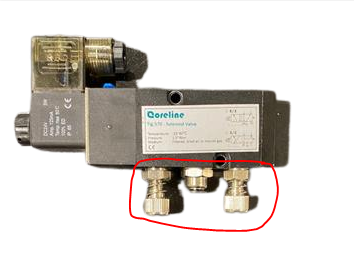
3. Actuate the valve and observe behavior
Actuate the valve using one or more of the following methods:
-
Command open/close from the HMI
-
Manually actuate using the blue push-button on the solenoid.
Make sureit is NOT pressed and locked.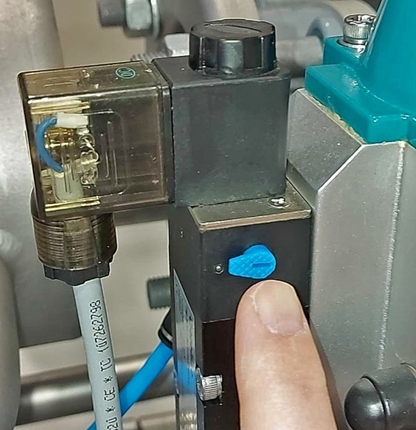
Observe simultaneously:
-
Valve movement
-
Mechanical indicator
-
HMI color/state
-
Feedback indicator LED on the valve (if present)
Most valves include:
-
A feedback indicator diode
-
A mechanical cam / metal target and sensor that detects position
👉 Verify that the indicator and cam move freely and consistently with the valve.
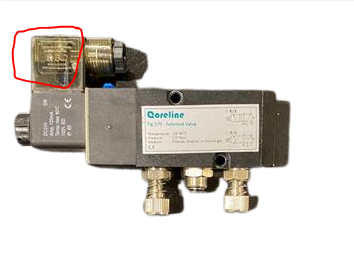
4. Swap components to move the fault (where possible)
This is often the fastest way to isolate the root cause.
Possible swap tests:
-
Swap feedback/positioner with a known-to-be-good valve
-
Swap valve hats / feedback modules (if cable length allows)
-
In rare cases, swap solenoid or air line (if practically feasible)
Observe on the HMI:
-
Does the fault move with the swapped component?
-
Or does it remain at the original valve position?
👉 If the fault moves, the swapped component is defective.
5. Electrical checks (only if required)
If the fault does not move and pneumatic behavior is correct:
-
Inspect wiring between feedback module and PLC
-
Check connectors, terminals, and cable glands
-
Verify continuity end-to-end
-
Inspect PLC I/O channel diagnostics
Electrical troubleshooting should only be performed by qualified personnel.
6. Reset and verify on HMI
After any change:
-
Press “Reset” on the HMI
-
Observe whether:
-
Alarm clears
-
Valve status updates correctly
-
👉 Many valve alarms will not clear until a reset is performed after feedback is restored.
Field insight – slow valves (most common root cause)
The most common root cause of valve feedback alarms is that the valve is too slow to reach its end position.
Typical causes:
-
Insufficient pneumatic pressure
-
Poor air quality (condensation, oil, particles)
-
Clogged or incorrectly adjusted silencers
Recommended actions:
-
Ensure sufficient air pressure, quality, and flow
-
Inspect and clean/replace silencers
-
If valve movement is mechanically correct but slow, consider:
-
Increasing alarm delay by approx. 2 seconds in alarm settings
-
Field insight – multiple valves affected
If multiple valves suddenly show feedback faults at the same time:
-
Check electrical documentation for a common I/O card
-
Inspect I/O card status LEDs and diagnostics
-
Verify common 24 VDC supply and return
👉 If faults correlate to the same I/O card, troubleshooting should start at the I/O card.
Common root causes
-
Slow valve movement due to air issues
-
Defective feedback module / positioner
-
Mechanical obstruction
-
Loss of pneumatic supply
-
Clogged or misadjusted silencers
-
Wiring or PLC I/O faults
-
Missing HMI reset
When to stop and contact LiqTech Service
-
If valve behavior remains inconsistent after mechanical, pneumatic, and feedback checks
-
If multiple valves are affected without a clear shared cause
-
If valve behavior impacts system safety or operation
Alarm ID references – Valve Feedback Fault (examples)
The following alarm IDs are examples of valve feedback–related alarms observed across different LiqTech Crossflow systems.
They are provided to help support agents recognize the alarm type when a customer references a specific alarm number.Other alarm IDs with similar alarm texts may exist depending on system generation, module type, and project configuration.
MK6 – Numeric alarm IDs
Valve feedback alarms on MK6 systems are typically repeated per valve and per module.
Module S
63
64
65
66
67Module M1
12
13
14
15
16
17
18
19
20Module M3
105
106
107
108
109
110
111
112
113
114
115
116
117Module CP
174
175
176
177
186
187Module HM
239
240
241
242
243
MK8 / project-based systems – D-series
Examples include:
D0001
D0002
D0003
D0305
D0412
D0413
D0414
D0415
D0416
D0422
D0506
D0507
MK8 / FM01 – F-series
Examples include:
F0113
F0114
F0115
F0116
F0117
F0118
F0119
F0126
F0141
Alarm types covered by this guide
This Valve Feedback Fault initial troubleshooting guide applies to alarms related to:
-
Valve feedback missing or inconsistent
-
Valve position not matching commanded state
-
Valve opening or closing too slowly
-
Valve not reaching end position within the allowed time
-
Feedback signal present but implausible
Root cause differentiation is performed inside the guide, based on valve behavior, pneumatic conditions, and feedback response — not on alarm ID alone.
-