---
title: How to calibrate an ABB regulation valve (FCV)
description: Step-by-step guide for calibrating an ABB regulation valve and positioner, including prerequisites, calibration procedure, and common troubleshooting notes.
---
[Skip to content](https://www.go.liqtech.com/knowledgebase-quickguides/how-to-calibrate-an-abb-regulation-valve-fcv#main-content)
English
Show submenu for translations

- Home
- Products
- Pricing
- Blog
- Company
Open main navigation
Close main navigation
- Home
- Products
- Pricing
- Blog
- Company
- English
Show submenu for translations
- Contact us
Contact us
How can we help you?
- There are no suggestions because the search field is empty.
1. [LiqTech Service Knowledge Base and Quick Guides](https://www.go.liqtech.com/knowledgebase-quickguides?hsLang=en)
2. [Troubleshooting](https://www.go.liqtech.com/knowledgebase-quickguides/troubleshooting?hsLang=en)
3. [FCV](https://www.go.liqtech.com/knowledgebase-quickguides/troubleshooting?hsLang=en#fcv)
# How to calibrate an ABB regulation valve (FCV)
## This guide describes how to perform a calibration of an ABB regulation valve using the local actuator interface. (FCV)
#### When to use this guide
Use this procedure when:
- A regulation valve has been installed or replaced
- Valve position feedback does not match the actual valve position
- The actuator has lost its calibration
- Commissioning or troubleshooting requires recalibration
- Internal leaking is observed - Flow readings on corosponding Flow transmitter even when FCV is at 0% or no flow readings when it is at 100%.
---
#### Preconditions
Before starting the calibration:
- The system is in a **stoptate**
- The valve can move freely between end positions
- Power and air is supplied to the valve actuator
- No active interlocks prevent valve movement - Valve is in auto on HMI.
---
#### Step-by-step calibration procedure
1. **Remove the front cover** of the ABB valve actuator.
2. **Press and hold the “F” push button for 5 seconds**.
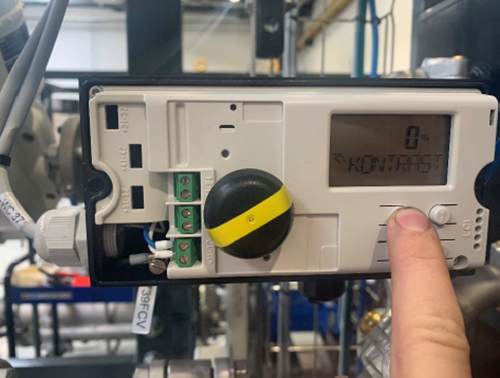
3. The menu **“ADJ\_ROT”** will appear on the display.
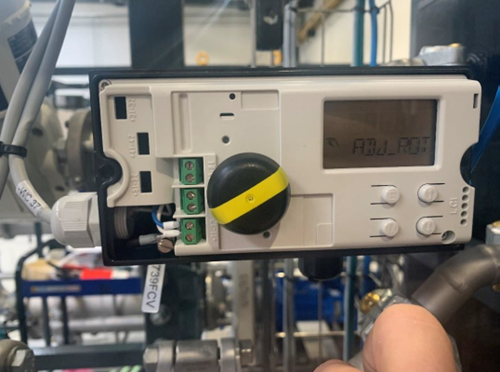
**Press and hold the “F” push button again for 3 seconds**.
- The calibration sequence will start automatically.
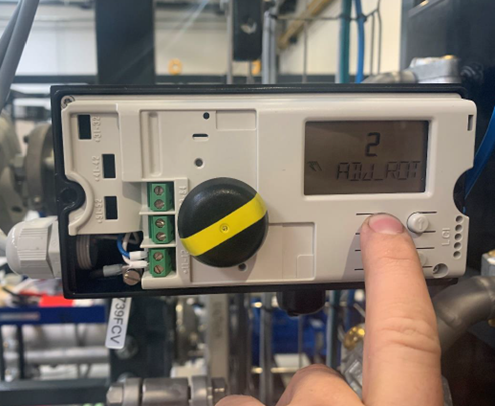
1. **Wait until the calibration sequence is finished**.
- This may take **a few minutes**.
2. Once calibration is complete, **adjust the visual position indicator if needed**:
- Remove the indicator
- Re-mount it so it correctly reflects the actual valve position
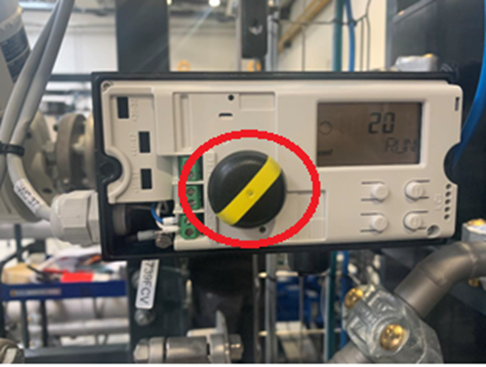
After calibration move the valve from 0% to 30% to 60% to 100% from the skids HMI and check if local display and HMI reading matches within +/- 1%.
---
#### Notes and common mistakes
- Do **not interrupt power** during the calibration sequence
- Ensure the valve is not mechanically blocked
- Calibration may fail if the valve cannot reach its full stroke
---
#### When to stop and contact LiqTech Service
Stop the procedure and contact LiqTech Service if:
- The calibration does not complete, even after an hour.
- Error messages appear on the actuator display
- The valve position remains incorrect after recalibration
---
#### Reference
This procedure is based on the internal quick guide:
*[Calibration of ABB regulation valve](https://www.go.liqtech.com/hubfs/Quick%20Guides/Calibration%20of%20ABB%20regulation%20valve.pdf?hsLang=en)*
- [Troubleshooting](https://www.go.liqtech.com/knowledgebase-quickguides/troubleshooting?hsLang=en#main-content)
- [FCV](https://www.go.liqtech.com/knowledgebase-quickguides/troubleshooting?hsLang=en#fcv)
- [Transmitters](https://www.go.liqtech.com/knowledgebase-quickguides/troubleshooting?hsLang=en#transmitters)
- [valves](https://www.go.liqtech.com/knowledgebase-quickguides/troubleshooting?hsLang=en#valves)
- [Pump](https://www.go.liqtech.com/knowledgebase-quickguides/troubleshooting?hsLang=en#pump)
- [IO](https://www.go.liqtech.com/knowledgebase-quickguides/troubleshooting?hsLang=en#io)
- [switches](https://www.go.liqtech.com/knowledgebase-quickguides/troubleshooting?hsLang=en#switches)
- [Permeate](https://www.go.liqtech.com/knowledgebase-quickguides/troubleshooting?hsLang=en#permeate)
- [FAQs](https://www.go.liqtech.com/knowledgebase-quickguides/faqs?hsLang=en#main-content)
- [CIP](https://www.go.liqtech.com/knowledgebase-quickguides/faqs?hsLang=en#cip)
- [Alarm](https://www.go.liqtech.com/knowledgebase-quickguides/faqs?hsLang=en#alarm)
- [Support](https://www.go.liqtech.com/knowledgebase-quickguides/support?hsLang=en#main-content)
- [Performance](https://www.go.liqtech.com/knowledgebase-quickguides/support?hsLang=en#performance)
- [Pool](https://www.go.liqtech.com/knowledgebase-quickguides/pool?hsLang=en#main-content)
- [Trouble Shooting](https://www.go.liqtech.com/knowledgebase-quickguides/pool?hsLang=en#trouble-shooting)
- [Operation & Maintenance](https://www.go.liqtech.com/knowledgebase-quickguides/pool?hsLang=en#operation-maintenance)
- [Crossflow](https://www.go.liqtech.com/knowledgebase-quickguides/crossflow?hsLang=en#main-content)
- [Trouble Shooting](https://www.go.liqtech.com/knowledgebase-quickguides/crossflow?hsLang=en#trouble-shooting)
- Home
- Products
- Pricing
- Blog
- Company
[mailto:email@email.com](mailto:email@email.com)
Copyright © 2026, LiqTech